Raising the FPS cap from 60 to 120
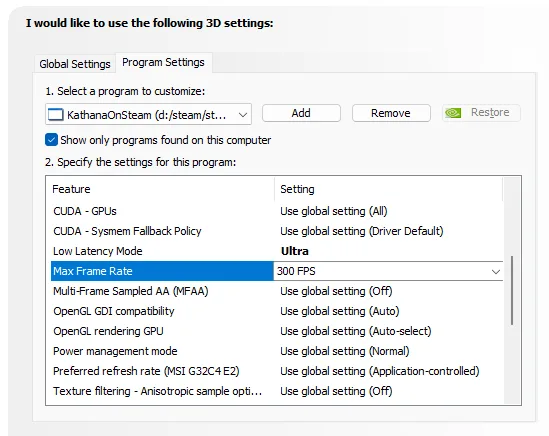
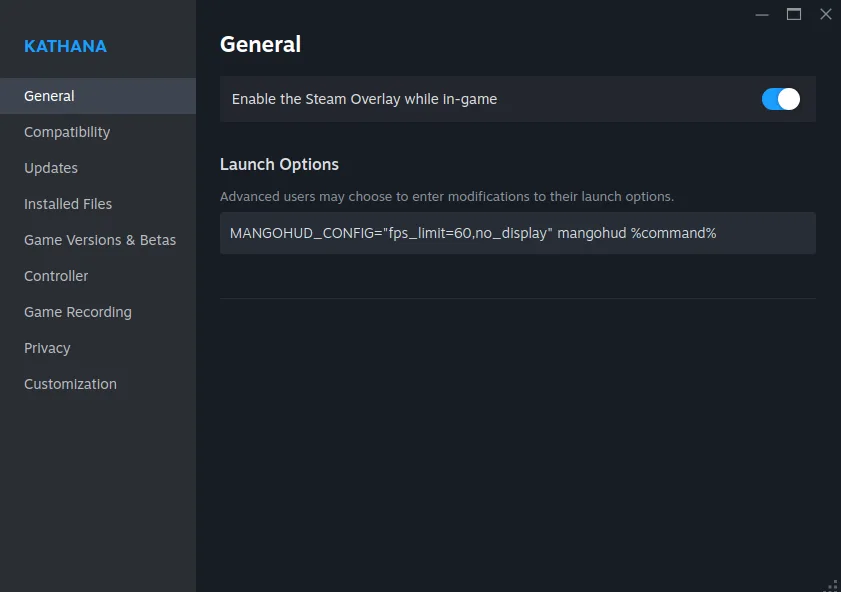
A player asks how to unlock 120 FPS on an NVIDIA laptop. The answer: open NVIDIA Control Panel, go to 3D Settings > Program Settings, add Kathana, and set Max Frame Rate to 120; if the game still sticks at 60, the monitor's refresh rate is the limit. A follow-up reply covers Linux (Ubuntu) users capping FPS with mangohud via a Steam launch option.
- nvidia control panel
- find "3d Settings"
- click "Program Settings"
- Find Kathana or Add it manually
| Setting | Value |
|---|---|
| Max Frame Rate | 120 |
Might locked by your monitors refresh rate.
for Linux (Ubuntu) user:
-
install mangohud with apt
sudo apt install mangohud, then add this launch option on kathana properties in steam:MANGOHUD_CONFIG="fps_limit=60,no_display" mangohud %command% -
remove
no_displayif you wanne see the statistics on screen like FPS/GPU and graph
Screenshots
What this shows
I would like to use the following 3D settings:
Global Settings | Program Settings
- Select a program to customize:
KathanaOnSteam (d:/steam/st...) | Add | Remove | Restore
- Show only programs found on this computer
- Specify the settings for this program:
| Feature | Setting |
|---|---|
| CUDA - GPUs | Use global setting (All) |
| CUDA - System Fallback Policy | Use global setting (Driver Default) |
| Low Latency Mode | Ultra |
| Max Frame Rate | 300 FPS |
| Multi-Frame Sampled AA (MFAA) | Use global setting (Off) |
| OpenGL GDI compatibility | Use global setting (Auto) |
| OpenGL rendering GPU | Use global setting (Auto-select) |
| Power management mode | Use global setting (Normal) |
| Preferred refresh rate (MSI G32C4 E2) | Use global setting (Application-controlled) |
| Texture filtering - Anisotropic sample opti... | Use global setting (Off) |
What this shows
KATHANA
General
General
Compatibility
Updates
Installed Files
Game Versions & Betas
Controller
Game Recording
Privacy
Customization
General
Enable the Steam Overlay while in-game
Launch Options
Advanced users may choose to enter modifications to their launch options.
MANGOHUD_CONFIG="fps_limit=60,no_display" mangohud %command%
From the replies
- bahadhur12 Aug 2026
It doesn't fix the situation, but it makes the freezes happen less frequently than before the setting change.