Client troubleshooting and important information
This version was translated automatically. The author wrote it in Español. Read the original
This guide brings together steps to resolve unexpected crashes, disappearing monsters, and problems starting the game client. It also explains how to repair EasyAntiCheat and which files to attach to a support ticket if the issues continue.
🇲🇽 Spanish
After the launch of the new client, we have identified critical problems affecting some players, despite having carried out extensive internal testing. We fully understand how frustrating this can be, and we want to assure you that we are actively working, together with our community, to resolve these problems as soon as possible.
In the meantime, we recommend following the steps below to minimize or resolve these issues:
If you experience unexpected crashes or disappearing monsters:
- Make sure Windows is up to date.
- Update your graphics card drivers to the latest version.
- If you applied compatibility modes to the game executables, disable them.
- Restart your PC and try running the game again.
If the unexpected crashes continue, please send us a support ticket attaching the .crashdump folder and the katana.log file.
If the game client does not start:
- Uninstall the game and completely close Steam.
- Open Steam again with Administrator privileges and install the game again.
- In the game launcher, go to Opciones.
- Click Reparar EasyAntiCheat and try starting the game again.
If the game client still does not start, press Windows + R, type %AppData%\EasyAntiCheat, and press Enter.
Inside that path, open the following two folders until you locate the anticheatlauncher.log file.
Please send us a support ticket and attach this file for review.
Our team will carefully review all reports received.
We sincerely appreciate your patience and support.
Screenshots
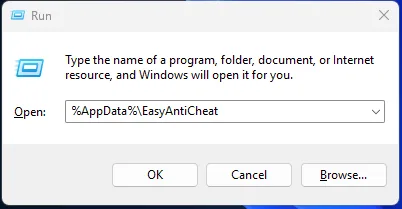
What this shows
%AppData%\EasyAntiCheat