

general
How to use Party Finder
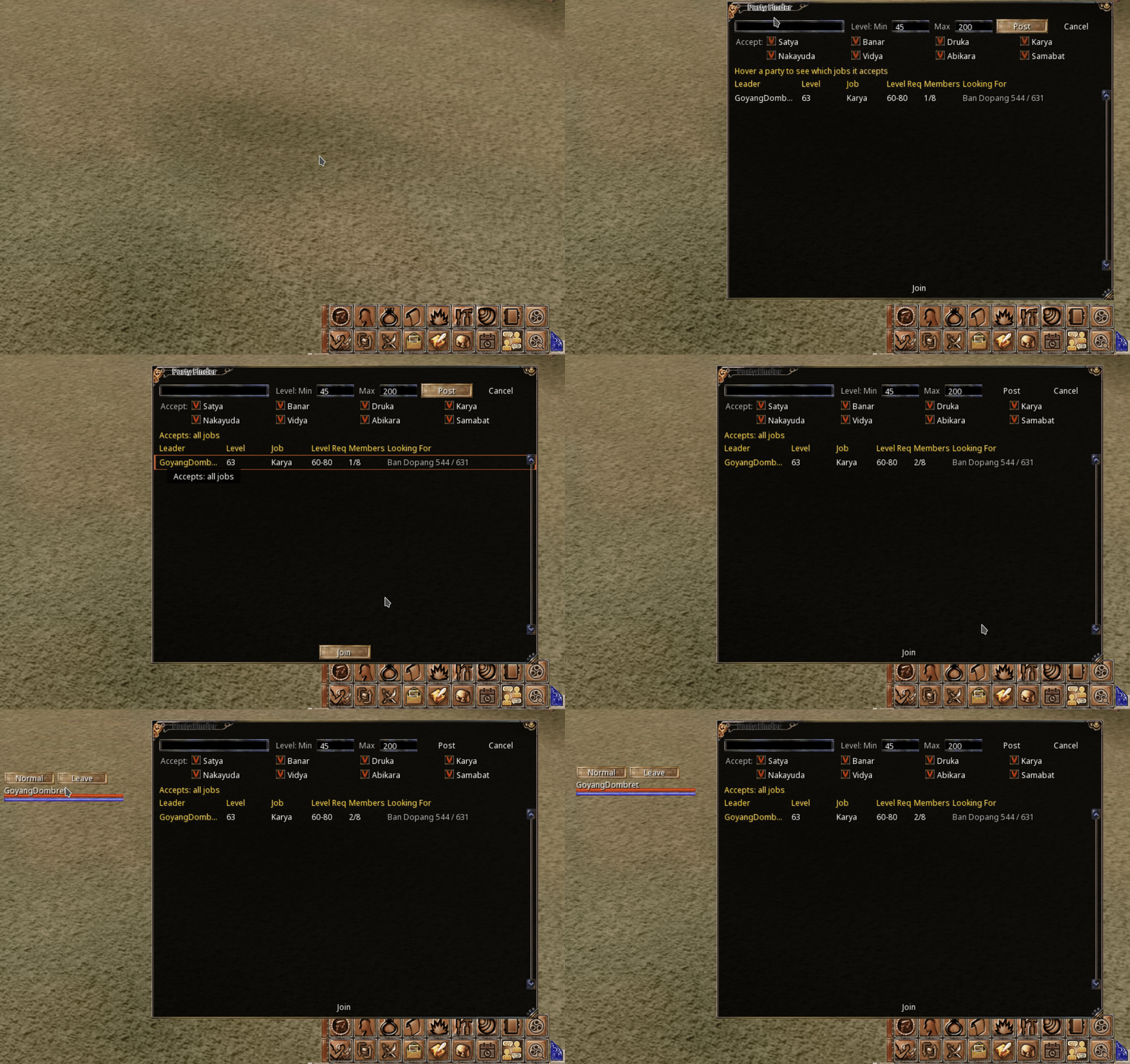
Explains how to open the Party Finder from the quick bar, create a party by setting a title, level range, and accepted job, then post it. Also covers how to join an existing party listing and why some listings appear red (ineligible due to level or job). Notes that listings disappear once full or when party leader transfers before it is full, requiring a repost.
I attached gif on how to use party finder.
Basically you just need to click Party Finder icon in the quick bar.
- To create party, enter title, min & max level, what job to accept, click Post.
- To join party, in the comment.
- To join party, click the Party Finder Icon, click available open slot party listing, then click join.
- If the listing is red, it means you are not eligible, either the level requirement or the job accepted.
Note:
- if the party is full, the listing will automatically dissapear
- if you transfer PL before its full, it will dissapear too, new PL need to post the party listing again
Screenshots
What this shows
| Row | Icons (left to right) |
|---|---|
| Top | (unlabeled icons) |
| Bottom | (unlabeled icons) |