

Fix Easy Anti Cheat error 30005
Explains that error 30005 can be caused by Windows Security's Memory Integrity feature blocking Easy Anti-Cheat's kernel driver. Gives step by step instructions to disable Memory Integrity via Core Isolation settings and restart the PC to resolve the issue.
Error 30005 may occur when Windows Security's Memory Integrity feature prevents Easy Anti-Cheat's kernel-level driver from starting correctly. Disabling this feature may resolve the issue. Follow the steps below:
- Press Windows + S, type Windows Security, and press Enter to open it.
- Navigate to Device security from the sidebar or main dashboard.
- Under Core isolation, select Core isolation details.
- Locate Memory integrity and toggle the switch to Off. If prompted for administrator permission, select Yes.
- Restart your PC to apply the changes.
Once your system has restarted, launch Kathana again to check whether the issue has been resolved.
Screenshots
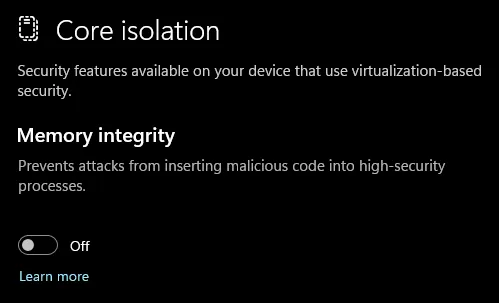
What this shows
Core isolation
Security features available on your device that use virtualization-based security.
Memory integrity
Prevents attacks from inserting malicious code into high-security processes.
Toggle: Off
[Learn more](Learn more)