

Kathana Event Mini: Desktop Event Timer Tool
An unofficial fan made desktop widget that tracks upcoming Kathana events with countdowns, showing both server reference time and local time. Covers download and setup steps, mini and regular window sizes, 35 included skins plus a custom skin editor, and notes that it works offline on Windows 10/11 with Microsoft Edge.
Hey everyone!
Made a little event timer for Kathana. Thought I'd share it here in case anyone else finds it useful.
I wanted something that would let me keep track of events without constantly checking Discord or opening the game just to see what's coming up.
It's inspired by those old Winamp-style desktop widgets. Nothing complicated, just a small window you can leave open while grinding or doing other things.
A few things I added:
- Upcoming events with countdowns
- Server schedule time and your local time
- Regular and Mini window sizes
- 35 skins, including a classic Winamp-inspired one
- Remembers your preferred window size
- Works offline without needing to log in
It's free, and there's no installation required. Just extract the files and run the launcher.
You can check it out here:
https://apxinfinity.github.io/kathana-taney-calculator/event-mini/
Just a heads-up: The schedule is based on published event times, and the server clock uses UTC−3 as a reference. It's not connected directly to the game's server, so event times might need updating if the developers change anything.
This is just an unofficial fan project I made for convenience, especially for fellow old-school players who appreciate simple desktop utilities.
Hope some of you find it useful! Feedback and suggestions are always welcome.
🖥️ Kathana Event Mini How to Download & Use
For anyone interested in trying the event timer, here's a quick guide. No technical knowledge needed!
Step 1 Download
- Visit the website:
https://apxinfinity.github.io/kathana-taney-calculator/event-mini/ - Click ⬇ Download v0.8 ZIP.
- Wait for the ZIP file to finish downloading.
Step 2 Extract the Files
- Find the downloaded ZIP file, usually in your Downloads folder.
- Right-click it and select Extract All.
- Open the extracted folder.
Step 3 Launch the Timer
- Find Launch Kathana Widget.bat.
- Double-click it.
- That's it! The event timer should open in its own small window.
Step 4 Customize It
Once it's running, you can:
- Switch between MINI and REGULAR window sizes.
- Choose from 35 different skins.
- View upcoming events and countdowns.
- Check both your local time and the server's schedule-reference time.
The main launcher also remembers your last window size and position!
A Few Things to Know:
- Designed for Windows 10/11.
- Requires Microsoft Edge.
- No installation or account registration needed.
- No need to run anything as administrator.
- Works offline after downloading.
- Doesn't require your Kathana login credentials.
You can also try the browser version by clicking Open in browser on the website.
That's pretty much it. Just a small desktop companion to help keep track of events while grinding.
Hope it helps! 😁
Unofficial fan-made utility. Not affiliated with the Kathana development team.
For those who downloaded the event timer, here's a quick rundown on how to use it.
Once you've extracted the ZIP file, just open the folder and double-click Launch Kathana Widget.bat. The timer should pop up in its own little window.
You'll see the server's reference time (UTC−3), your local time, and a countdown to the next event.
You can switch between Mini and Regular sizes depending on how much screen space you want to use. Feel free to move or resize the window too. It'll remember your last window size and position when you close it normally.
Click SKINS if you want to change how it looks. There are 35 designs to choose from, and you can even make your own.
The EVENTS button shows the event schedule if you want to check what's coming up.
That's pretty much it. Just leave it running somewhere on your desktop while grinding. No need to keep checking Discord for event times. 😁
Oh, and it works offline! Just make sure you're on Windows 10/11 with Microsoft Edge installed.
Hope it helps!
Oh, almost forgot. You can actually make your own skins for the event timer too. 😁
I added a little editor so you can mess around with the colors and make something that suits your taste. No coding needed.
Just open the widget, click on Skins, and scroll down to the custom skin section. Give your design a name, play around with the colors, and save it once you're happy with how it looks.
You can save up to 50 custom skins.
If you want to share one with a friend, there's an option to export your design as a small JSON file. They can import it through the same skin menu.
Would be nice to see what everyone comes up with. Feel free to share screenshots of your designs here. 🙂
Screenshots
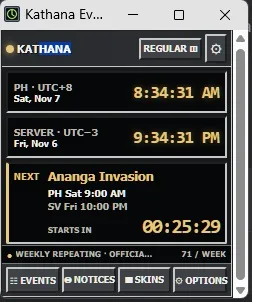
What this shows
Kathana Ev...
KATHANA | REGULAR
| Clock | Zone | Day | Time |
|---|---|---|---|
| PH | UTC+8 | Sat, Nov 7 | 8:34:31 AM |
| SERVER | UTC-3 | Fri, Nov 6 | 9:34:31 PM |
NEXT: Ananga Invasion
- PH Sat 9:00 AM
- SV Fri 10:00 PM
- STARTS IN 00:25:29
WEEKLY REPEATING · OFFICIA... | 71 / WEEK
EVENTS | NOTICES | SKINS | OPTIONS
From the replies
- apx62919 Nov 2026
Sure bro, there’s a website version.